Két bạc cao cấp - Siêu thị két sắt nhập ngoại uy tín- Viet Trans
Công ty Cổ phần xuất nhập khẩu và vận tải Viettrans
0917967167 - 0909616665
Đang online: 2|Đã truy cập: 591172
Công ty Cổ phần xuất nhập khẩu và vận tải Viettrans
When the date or time appears on the display, you may press the key “#” once to switch between year, month and date or hour, minute and day. The year month and date or hour, minute and day selected for change will start to flash.
03:40 12/04/2017
I- HOW TO OPEN:
Press “ # ”
Key in a 1 – 8 digits person code or master code, then press “#”, there will have two beeps if the code is correct, the screen display “OPEN”.
Turn the knob or key in 6 seconds after display “OPEN”
Note:
The screen will display “ERROR” if entered incorrect code. If entered incorrect code three times, the alarm will be hold one minute, entered correct code to relieve the alarm.
Key in “*”, and the hide function is enabled and “-” will be displayed for each input. If no action in five seconds, the hide function will close.
The hide function enabled by the hotkey is to be used for current operation only. The screen will return to digit display mode in future operations.
Xem thêm:
II – HOW TO CHANGE THE PERSON CODE
Press “#”
Key in an 1 – 8 digits person code. Then press “#” to confirm, there will be two beeps if the code is correct.
Press “*” in 7 seconds after display “OPEN”, input 1 – 8 digit new person code. Press “#”
It is change the person code succeed if display “INTO”.
Xem thêm: du học Hàn Quốc, lịch thi topik 2026, du học thạc sĩ Hàn Quốc, vé xe Hà Giang
III – HOW TO SETUP ALARM
1 . Press “0”
2. Screen will display “ BELL ON”
Safe is being subjected to a vibration will alarm. The sound will stop in 60 sencond but alarming mode can’t be cancelled. When the alarm sound, it will stop alarming if the correct code is entered.
IV – HOW TO SETUP DATE
The first time batteries are installed, the date and time on the display will read 00 – 01 – 01 and 00 – 00 respectively.
When the standby mode, press the key “*” and the display will read date 00 – 01 – 01 at first and then changes to sleep in three seconds.
When the date or time appears on the display, you may press the key “#” once to switch between year, month and date or hour, minute and day. The year month and date or hour, minute and day selected for change will start to flash.
Use digit key “0” and “8” to change year, month and date or hour, minute and day that is flashing. Each time you press the key “0” the digit on display will decrease by one. Each time you press the key “8” the digit on display will increase by one.
V – HOW TO USE EMERGENCY LOCK
Use one stick with diameter of around 1.0mm, push smoothly this stick into tiny hole under keypad and plastic cover on keypad is opened at the same time.
Insert emergency lock and turn the key to the left until hard turning.
Keep the emergency lock in, at the same time turn the main lock and knob to open the door.
Bài viết liên quan
.jpg)
Khi sử dụng Két Bạc khóa điện tử cần làm theo các bước sau
Xem chi tiết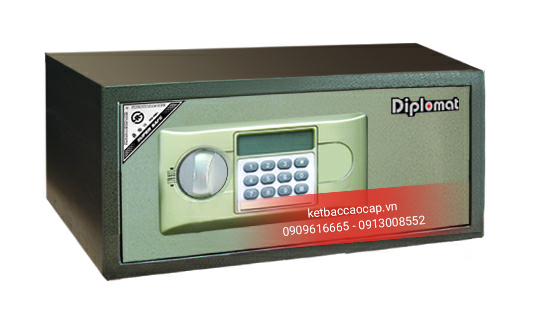
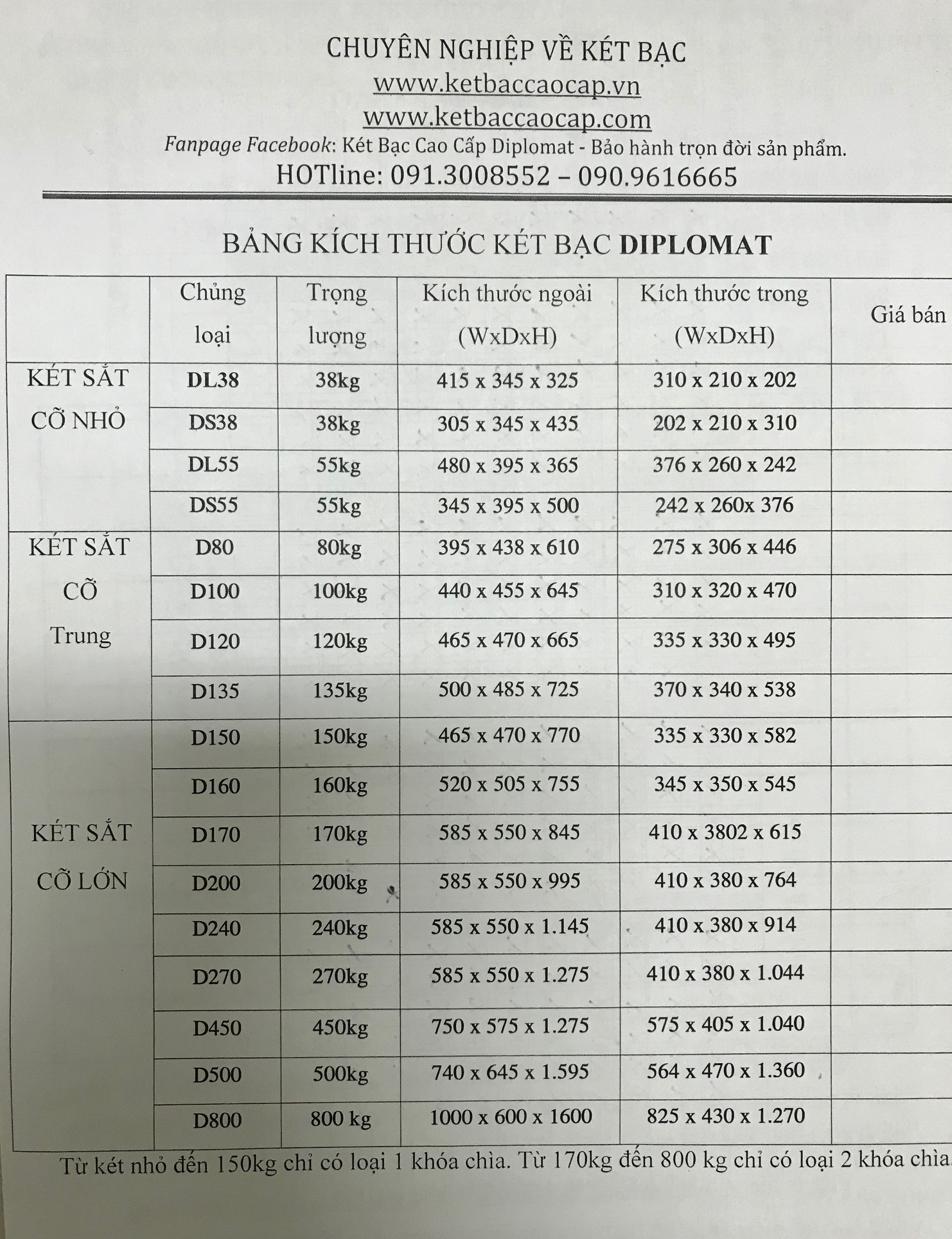
Bảng kích thước trong, kích thước ngoài. Các kích thước này đã bao gồm cả chân đế
Xem chi tiết
Đối với két khóa cơ, trong quá trình đổi mã số, bạn thao tác chưa chính xác, làm loạn mã hoặc không nhớ mình đã...
Xem chi tiết
Mở cánh cửa két ra, ta nhìn thấy chốt sập then ở cạnh trong của cánh két (phía bản lề). Nhấn vào đầu chốt để tay...
Xem chi tiết.jpg)
Bấm một chữ số một lần còi sẽ kêu một lần, màn hình LCD hiển thị các chữ số được nhập. Bấm bất kỳ một...
Xem chi tiết